Thank you for adding your suggestion! Our enhancement roadmap is usually planned for at least 2 months in advance, though we are often looking for highly desired ideas (please vote!).
Any new requests will be considered by our team to determine their universal benefit to all our customers and then added to the roadmap based on potential impact.

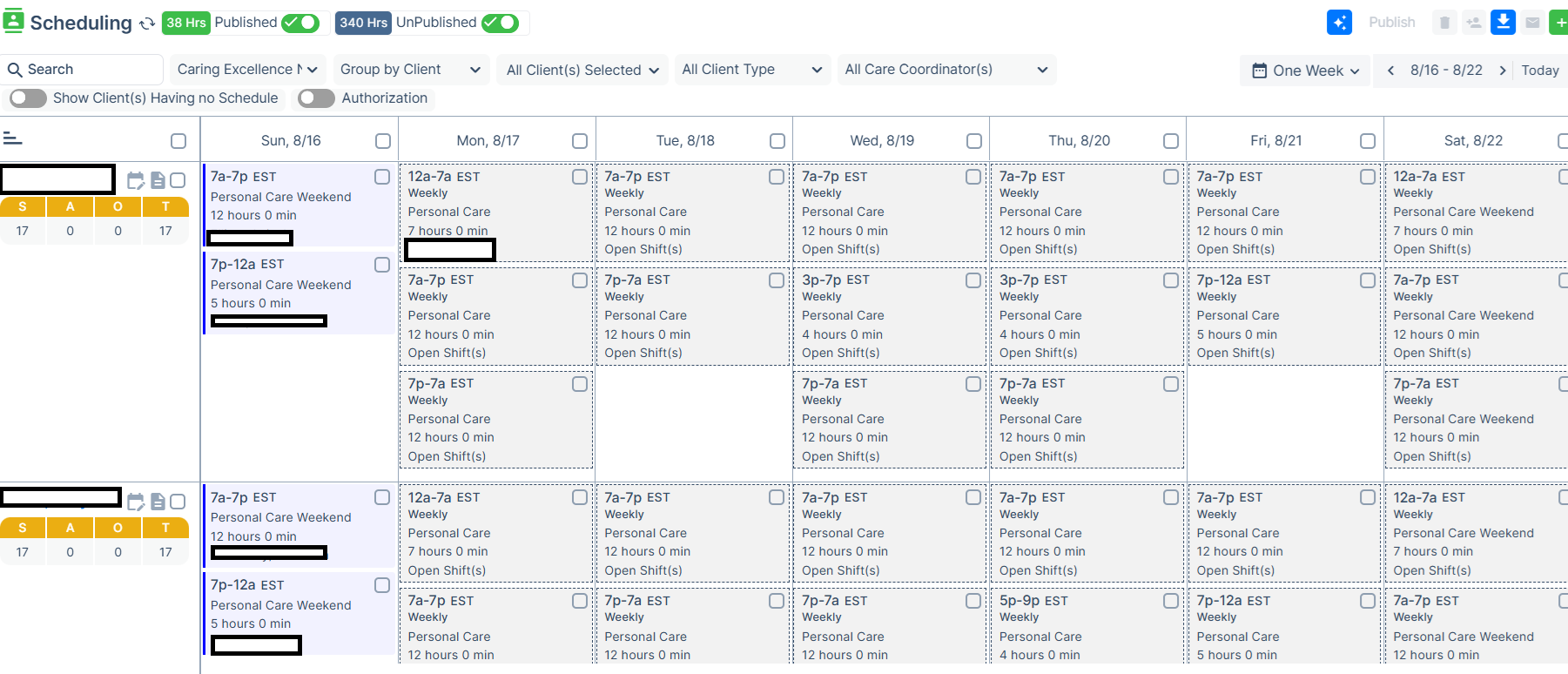
 Modify unpublished shifts on the screen
On the Schedule Calendar (new) screen it would be ideal to see Published and Unpublished shifts and be able to modify unpublished shifts prior to publishing.
This would make the new AI feature more valuable for future weeks, put caregivers in and see if it'll work and be a fit before it's completely published and caregivers see their schedule. (essentially a way to draft published schedules)
This way a scheduler can start to build the schedule before caregivers can see the schedule.
Currently you cannot do anything to the unpublished grayed out boxes below.

Placeholder for Date format YYYY/MM/DD
Displaying a placeholder, such as YYYY/MM/DD, within date fields would provide better guidance during data entry, help reduce input errors, minimize incomplete applications, along with reduced calls to CareSmartz 360 Help Desk.

Request to Implement Incident Reporting Module
Our agency needs a built‑in Incident Reporting module to stay compliant with state and federal home‑care regulations. At this time, the platform does not support incident documentation, and we are requesting that this feature be added.
We need the module to include:
- Required incident details (date/time, location, individuals involved, narrative, actions taken, notifications, follow‑up)
- Audit‑ready documentation (timestamps, edit history, exportable reports)
- Mobile‑friendly caregiver reporting with required fields
- Ability to upload photos, documents, and witness statements
- Automated supervisor alerts and follow‑up workflows
- Role‑based access control
- Reporting tools for trends and quality improvement
This functionality is essential for compliance, Medicaid audits, and risk management. Please let us know if your team can implement this and what the timeline might look like.
Thank you.
when we cancel a shift but want to pay the caregiver without it going towards hours
We pay our caregivers for shifts if our clients cancel and it was committed to the caregiver. However since they didn't technically actually work the hours we do not want it counted towards their week of work (they could run into OT). Our previous software allowed us to do this, but CS counts it towards hours.

Idea to help scheduler
I would like to be able to make modifications to unpublished shifts that are being viewed in the Schedule Calendar New. I would like to: Be able to select a caregiver for a unpublished shift Change start and end times for a unpublished shift
Schedule Tasks at Specific Times
It would be much more convenient to be able to schedule tasks at specific times rather than morning, afternoon, evening, and NOC. Other software does this and it works so much better. Some of our clients schedule changes from visit to visit so if we're not careful, tasks can get missed if they're not scheduled in the right time frame. Or they become double scheduled. Currently, if the majority of the shift is on NOC, then a bedtime med reminder may not show up because that's on an evening time frame. We have had to put that med reminder in both evening and NOC time frames, and then be careful not to have both caregivers give meds. It makes no sense.
Ideally, if we schedule a task to be completed at 9pm, it should then pop up for whoever is scheduled during that time. If the evening person stays until 10pm, then it would show up on their shift and not on NOC shift. Visa versa.
"Select All" Task Button
The button to "select all" tasks needs to be either eliminated or made as an optional function to agencies. It creates a lot of problems with caregivers mistakenly selecting it or intentionally selecting it to get through the tasks quickly.
The issue is that, for most of us, these tasks become legal documents if we were to ever have an issue with a client or their care. By having this select all button, that causes a gray area in our legal documentation and could come back to bite us.

Adding Next and Previous button in Time Tracking feature
I use the Time Tracking feature(Scheduling -> Time Tracking -> Views) to audit weekly schedules for errors before generating invoices. Because there are 7 to 15+ entries per client, I have to review each client individually to ensure accuracy.
The current process for switching between clients is repetitive and slow.
1.I must manually deselect the current client checkbox.
2. I must then find and select the next client checkbox.
3. Because the client list is long and contained within a small scrollable window, I am forced to scroll within that specific container every time I reach the bottom of the visible list to find the next name.
Suggestion: I am suggesting the addition of a Next and Previous button or navigation feature. This would allow me to cycle through the client list automatically. Pressing a button should move the view to the next client without requiring me to manually toggle the checkboxes or scroll through the selection window.
Thank you for considering this improvement.

Option to hide pay rate in scheduling from specific users
Most employees need to access the scheduling module. Only two should be able to see the pay rates involved. Human Resources Rep and Finance Rep. It would be helpful to be able to limit employee payrates from specific users.

: Request for automatic task deletion when clients status changes to inactive
• Module: Client management and task deletion
• Description: Request for automatic task deletion when clients status changes to inactive
• Current workflow issue: Manual deletion of individual tasks for each inactive client
• Impact: Time-consuming process, especially for recurring tasks extending years into the future
Customer support service by UserEcho