Your comments

Good news - this report and display on the Caregiver profile is available in Caresmartz360 https://intercom.help/caresmartz/en/articles/11328227-exclusion-list-report
Thank you for sharing your feedback. The statuses in the system are configurable, though they will display in alphabetical order by default (with the exception of a few hard-coded statuses). If you’d like to control the order, you can do so by adding numbers at the beginning of each status name (e.g., “1 - New,” “2 - In Progress,” etc.). This will allow you to create a clear progression that works best for your process.
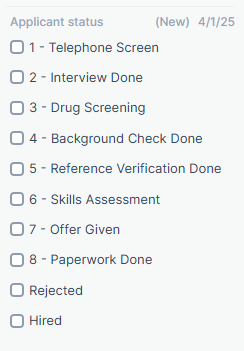
Thank you for your feedback. Caresmartz360 provides a variety of workflows to suit your needs.
1 - when deactivating a client, an option appears to delete all future visits
2 - when deactivating a caregiver, an option appears to move all future visits to "Open" or unstaffed
3 - There is a multi-edit function that allows you to reassign all visits to another caregiver. https://intercom.help/caresmartz/en/articles/5672712-multi-edit-option-under-schedule-calendar-and-client-s-calendar
4 - There is a bulk delete option for deleting all visits in a given date range. This is not reversible, so please proceed with caution. https://intercom.help/caresmartz/en/articles/2133013-bulk-delete-schedules
Thank you for taking the time to share your feature request with us. We truly appreciate your contribution to making our platform even better. Your idea has been noted, and our team will review it thoroughly to determine its feasibility and potential impact.
We value your input and will keep you updated on any developments regarding your suggestion. Feel free to keep the ideas coming – your feedback helps us enhance the user experience for everyone.
Thanks so much for sharing your feature request—we really appreciate your input. We're happy to let you know that we're already working on improving this part of the workflow, and your suggestion fits right in with our plans.
This update will be part of the upcoming enhancements to our Settings UI/UX, so keep an eye out for those changes in the next few months. Your feedback helps us make the platform better for everyone.
In the meantime, you are able to add the authorization text to the existing form as a question.
Thanks again for being a valued part of our community!
Thanks so much for sharing your feature request—we really appreciate your input. We're happy to let you know that we're already working on improving this part of the workflow, and your suggestion fits right in with our plans.
This update will be part of the upcoming enhancements to our Settings UI/UX, so keep an eye out for those changes. Your feedback helps us make the platform better for everyone.
Thanks again for being a valued part of our community!
Thank you for your Feedback. Caresmartz360 uses standardized calendar date pickers throughout the system.
Please see the article on using them for assistance with date ranges in the deep past.
https://www.intercom.help/caresmartz/en/articles/10872799-using-the-calendar-icon

Thank you for your submission.
While we won't be making global changes to a widely used report, I am happy to submit your sample and criteria for consideration in Custom Reports.
Additionally, I have removed your attachment as it was not redacted and this is a public forum.
Thank you.
Thank you for your suggestion.
Good news! This function is already in place.
To control your Careiver application settings, navigate to the settings>>Caregiver>>Caregiver Applicant Settings
From there, you will see a section called "Miscellaneous Questions". There are then three settings 1 - Enable/Disable 2 - Is Mandatory? - this is where you can make one or more questions required. 3 - Mandatory Count - this setting allows you to choose the number of custom questions you want to be required. If you have three questions, set this to 3.
Customer support service by UserEcho


Thank you for this thoughtful suggestion. We understand the challenges agencies face when reconciling actual caregiver time against scheduled and authorized service hours, particularly in high-volume payroll and billing environments.
As we evaluate this request, we're exploring solutions that support the underlying need for greater visibility and operational efficiency while remaining aligned with payroll, labor, billing, and EVV compliance requirements. Rather than automatically limiting recorded time, we're considering approaches that help agencies quickly identify and manage schedule variances, review exceptions, and take appropriate action based on their own business policies.
We appreciate the detailed feedback and real-world examples provided. They help us better understand the operational impact and guide our evaluation of potential enhancements.